The complete filtering database: every host name, with its role
One domain runs many services, but a domain database gives them all one category. Our SNI database gives each of 1.65 billion host names its own category and one of 21 roles.
- Fewer complaints and tickets. Blocking a category no longer breaks the logins, APIs and updates that applications need.
- No lost ad revenue. Ad servers have their own role. So blocking LinkedIn no longer breaks the LinkedIn ad tag on other companies' websites, and blocking games no longer stops Unity Ads in mobile apps.
- No blocked legitimate use. Gmail, Google search and Google sign-in can be blocked or allowed separately, instead of all of google.com at once.
- Fewer fake logins get through. Login pages on free hosting such as pages.dev have their own role, so a policy can block or isolate them without blocking every website on pages.dev.
pagead2.googlesyndication.com- Root domain
- googlesyndication.com
- Category
- Marketing and Advertising
- Role
- ads_tracking
- Owner
- google.com
i.ytimg.com- Root domain
- ytimg.com
- Category
- Social Networking
- Role
- cdn
- Owner
- youtube.com
api.spotify.com- Root domain
- spotify.com
- Category
- Music
- Role
- api
- Owner
- spotify.com
login.microsoftonline.com- Root domain
- microsoftonline.com
- Category
- Computer Software and Applications
- Role
- login
- Owner
- microsoft.com
Contents
Five parts on one page. Pick a part, or read from the top.
Why root domains are not enough: cases
Five real cases where one category for a whole domain blocks too much or too little.
Hostname-aware policies
What a root domain database covers, what it cannot cover, and what the extension adds.
SNI Classification Engine
Category, traffic role and owner for every host name, classified on your own servers.
Part 1 · Why root domains are not enough: cases
Five real cases where one category for a whole domain blocks too much or too little.
↑ ContentsA domain filtering database gives one category to a whole domain, but the host names under it do very different things. On encrypted connections, a filter often sees only the host name. With one category per domain, a filter misses things it should block and breaks things it should leave alone.
| Case | What can happen with root domains only | In our 1.65B SNI database | The fix |
|---|---|---|---|
| AI tools whose API is used by other softwareExample: openai.com | A customer blocks openai.com as an AI tool. That also blocks api.openai.com, which the company's own CRM, helpdesk and coding tools use, so these tools stop working. | openai.com: 136 host names, for example:auth.openai.comlogincdn.openai.comcdnapi.openai.comapi… and 133 more | The policy blocks the OpenAI pages employees open, but allows api.openai.com, so the company's own software keeps working. |
| Blocked domains that serve ads on other websitesExample: linkedin.com | Many companies that advertise on LinkedIn put the LinkedIn Insight Tag on their own websites. The tag sends its data to px.ads.linkedin.com. When a filter blocks linkedin.com, it also blocks px.ads.linkedin.com. Visits and sign-ups from people behind that filter are then not counted, so these companies pay for ads but cannot see what the ads brought them. This is very common, because most websites carry ad tags. The SNI database solves it. | linkedin.com: 14,347 host names, 106 of them ad and tracking hosts, for example:www.linkedin.comwebsiteads.linkedin.comads_trackingpx.ads.linkedin.comads_trackingInfrastructure provider of the ad hosts: Ad tech… and 14,344 more | The policy blocks linkedin.com, but allows LinkedIn's ad hosts, so the tag on advertisers' websites keeps counting visits and sign-ups. |
| Large platforms where customers want one service but not anotherExample: google.com | Some customers want to block Google search but keep Gmail. With one category for all of google.com, they can only block search, Gmail and Google sign-in together, or allow all three. | google.com: 54,572 host names, for example:www.google.comwebsitemail.google.comemailaccounts.google.comlogin… and 54,569 more | The policy blocks Google search (www.google.com), while Gmail (mail.google.com) and Google sign-in (accounts.google.com) keep working. |
| Blocked categories that also host software downloads and adsExample: unity3d.com | Unity is a games engine, so unity3d.com is in the gaming category. When a customer blocks gaming, developers can no longer install or update the Unity editor, and mobile apps lose their income from Unity Ads. | unity3d.com: 2,215 host names, for example:download.unity3d.comdownload_updatepublic-cdn.cloud.unity3d.comcdnunityads.unity3d.comads_tracking… and 2,212 more | The policy blocks games, but allows Unity's download, CDN and ad hosts, so developers can install Unity and apps keep earning from Unity Ads. |
| Free hosting used for fake login pagesExample: pages.dev | pages.dev is Cloudflare's free hosting. Anyone can create a website there in minutes, under any name they like, such as advertiser-account-access-checkpoint-9t6.pages.dev. Attackers use it for fake login pages of ad accounts, banks and crypto exchanges. Filters trust pages.dev because it is a hosting service. With one category for all of pages.dev, a filter can only block every website on it, including the legitimate ones, or let the fake login pages through. | pages.dev: 46,746 host names, 167 of them login pages, for example:advertiser-account-access-checkpoint-9t6.pages.devloginOwner: the project itself, infrastructure provider: Cloudflare… and 46,745 more | The policy blocks login pages on free hosting, or opens them in isolation with the keyboard disabled, so no one can type a password into them. Normal websites on pages.dev stay open. |
Host names, counts, roles, owners and providers above are real rows of the database. Role values are explained in Part 4.
Part 2 · Hostname-aware policies
What a root domain database covers, what it cannot cover, and what the extension adds.
↑ ContentsThe root domain database today
A root domain database, as filtering products run it today.
1 to 20 million domains
Domain filtering databases from 1 million to 20 million root domains, each with its category, so policies can allow or block whole websites.
59 categories
The categories customers already pick in their policies.
Automatic updates
Every new version of the file downloads through our API, with no manual steps.
AI tools as a category
AI tools carry the AI / LLM Tools category in the domain filtering database, so customers can allow or block AI as a category.
What a root domain cannot cover
A category per root domain works for websites. It cannot say what a host name under that domain is doing.
Under google.com, gemini.google.com is an AI tool, mail.google.com is webmail and accounts.google.com is a login page. Large platforms carry websites, APIs, CDNs and telemetry under one root, so blocking the root domain breaks applications and allowing it lets everything through. For encrypted traffic outside a browser session, a gateway often sees only the host name (the SNI), not the full URL. The cases in Part 1 show what this means for a policy.
What the extension adds
Two parts that plug into the root domain database.
Hostname-aware policies
Every host name gets a category and one of 21 traffic roles, for example website, login, api, cdn, ads_tracking, telemetry, cloud_hosting, email, push_chat, download_update, remote_access and network. Policies apply categories to what a person opens and let api, cdn, telemetry and update traffic through. All 21 roles in Part 4.
SNI Classification Engine
Runs on your own servers with no outside calls in offline mode. Classifies 100,000 host names in under a second on a 12-core server, including host names that are in no list yet. The engine in Part 3.
Example rule: "Block Social Networking for contractors, but only for website and login traffic", so the APIs and CDNs that other apps depend on keep working.
How it fits an existing integration
Nothing in an existing integration changes. The extension adds files next to the domain database file.
| Today | With the extension | |
|---|---|---|
| Lookup key | Root domain | Host name first, root domain as the fallback |
| What a policy can target | 59 categories per website | 59 categories plus 21 traffic roles per host name |
| Host names not in any list | Root domain category only | Classified on your servers by the engine |
| Delivery | Automatic download through our API | The same API and the same update routine |
| Licence | Flat yearly | Flat yearly upgrade from the domain database licence, no metering by users or traffic |
Part 3 · SNI Classification Engine
Category, traffic role and owner for SNIs and host names, classified on your own servers.
↑ ContentsThree engines
The SNI Classification Engine (version 2.11) turns server names (SNIs/host names) into an IAB category, a traffic role, an owner and a status. Engine Offline and Live Owner Checks run entirely on your machines, with no connection to us. The engines provide the IAB category, the traffic role and the other columns for SNIs whose exact match could not be found in our 1.65B SNI database. The engines build on each other: each one includes the database and everything of the previous engine and adds one step. The first two run entirely in your environment.
No network access at all
Every SNI is first looked up in the delivered 1.65B SNI database. An SNI that is not in it is matched to its root domain in the delivered 120M root domain IAB database and classified with the rule set.
- Category in the IAB Content Taxonomy
- Traffic role: website, content delivery, interface, advertising and tracking, telemetry and more
- Owner and infrastructure provider for known services
- Suitable for air-gapped environments
Everything of Engine Offline, plus Live Owner Checks of unknown root domains
SNIs whose root domain is not in the database are checked live from your own network, through your proxy and resolver. Nothing is sent to us.
- Status: Live, Unresolvable, No address, Parked, Seized
- Owner, proven from the server's TLS certificate, its name servers, the domain's public registration record or our curated company tables
- The proven owner's IAB category for the SNI, and for the other SNIs of the same root domain
- A traffic role for every SNI
Everything above, plus IAB categories for new domains
Registered domains that are still uncategorized can be sent to our classification API, which categorizes them from their live website. Optional and under your control.
- Only registered domains are sent, for example example.com, never full host names
- No users, timestamps or traffic data
- You choose which domains to send
- Categories return in the same IAB taxonomy
- Optional: malware and unwanted software detection for the domains you send; flagged domains get the status Unwanted software, or Phishing or scam
How the engines supplement the 1.65B SNI database for SNIs without an exact match
Every SNI/host name is first looked up in the 1.65B SNI database. Every SNI/host name that is not found there goes through the same steps, in this order. The arrow between two steps says when the flow continues to the next one; an SNI that is answered leaves the flow and goes straight to the output.
The tag names the engine that does the step, the counter shows the position in the flow, and the line after it says where the engine runs.
1. Look up the SNI in the 1.65B database
The exact SNI/host name is looked up in the delivered 1.65B SNI database. Found: it takes its IAB category, traffic role and owner directly from the database, and the steps below are not needed.
2. Engine Offline: root domain
Not found: Engine Offline takes the registered root domain of the SNI (public suffix list) and looks it up in the delivered 120M root domain IAB database. Found: the SNI receives the IAB category of its root domain.
3. Engine Offline: traffic role
The compiled rule set assigns the traffic role from the host name and the root domain (website, content delivery, advertising, telemetry and more), also when the root domain has no IAB category, and names the owner of known services.
4. Live Owner Checks
Root domain not in the database: the SNI is checked live from your own network, through your proxy and resolver. Status from DNS, and an owner proven by the server's TLS certificate or name servers. As a last step, only where nothing else proved an owner, the company named in the root domain's public registration record. The proven owner's IAB category is used for the SNI. Nothing is sent to us.
5. Live classification
Root domains that are still uncategorized can be sent to our API, which categorizes them from their live website. Optional, under your control.
6. Output
One CSV row per SNI/host name.
Output
One row per SNI, in the same columns as our published sample, plus a status column. Every column and every possible value is listed in the data dictionary in Part 4.
| Column | Content |
|---|---|
SNI | The normalised server name |
Root Domain | Registered domain of the SNI |
Category | IAB Content Taxonomy v3 category (full list of IAB v3 categories); empty when no IAB category can be proven |
Multiple Categories | Category with confidence |
Method | Where the IAB category comes from. sni_direct: the host name itself, categorized from its own content. root_domain_direct: the SNI is a root domain and has its own IAB category. root_domain_represents: the IAB category of the SNI's root domain. root_domain_represents_owner: the IAB category of the company that owns the root domain. owner_domain_represents: the IAB category of the owner proven for this host. not_in_database: no IAB category. All values are listed in the data dictionary |
Description | Site description where one is available |
Role | Traffic role of the host name, for example website, cdn, api, ads_tracking, email, login. Live Owner Checks adds web_service, server, parked, seized and inactive, so every row gets a role. All 21 values are explained in the data dictionary |
Owner | Operator of the host name, when known or proven |
Infra Provider | Hosting, content delivery or platform provider, or the registered operator of the server's network |
Role Confidence | high, medium, low or inherit (the role of the root domain); see the data dictionary |
Non-production | yes for test, staging and development host names |
Status | The live status below; In database when database rows are not checked live |
Status values
| Status | Meaning |
|---|---|
| Live | The name resolves and points to a server |
| Unresolvable | The name does not exist, or its DNS is broken |
| No address | The domain is registered but points to no server |
| Parked | The domain is parked or offered for sale |
| Seized | The domain shows a law-enforcement seizure |
| Unwanted software | The domain is flagged for unwanted software (optional malware and unwanted software detection of API Classification) |
| Phishing or scam | The domain is flagged for phishing or a scam (same optional detection) |
| Check failed | The check did not complete within the time limit; the SNI keeps its role and can be checked again |
Live Owner Checks, optimized on real traffic
Live Owner Checks were built and tuned on real SNI/host name traffic, not on clean lists, and are optimized for accuracy across the wide range of cases found in our full database and in real network environments. The engine handles the cases that make SNI classification difficult.
Parked and for-sale domains
Recognised before anything else and reported with the status Parked.
Seized domains
Law-enforcement seizure notices are reported as their own status.
Shared infrastructure
Shared certificates and multi-customer hosting are detected and reported as infrastructure, with the provider named.
Owner only with proof
An owner domain is accepted only when the server's certificate or name servers list it, or when the domain's registration record names a company whose own domain is proven by our checked company table, which is delivered with the engines, or by that domain's own registration record.
Role before owner
Advertising and tracking hosts get the IAB category Marketing and Advertising, whoever operates them, and each service of a large group gets the IAB category of the service.
Clean provider names
Infrastructure providers come from known networks and the public internet registries.
Curated reference lists
Parking services, hosting and DNS providers, registrars and known companies, refreshed with every weekly update.
Built on 1.65 billion SNIs/host names
Our database of 1.65 billion SNIs/host names was built with exactly these classification and role rules.
Reviewed on real traffic
Live Owner Checks are reviewed in rounds on samples of real SNIs and verified on complete evaluation lists before each release.
Built for big batches
Engine Offline classifies 100,000 SNIs/host names in under one second (0.93 s) on a 12-core server. Live Owner Checks runs on the network, through your proxy and resolver, and is built for long runs: it never hangs and never loses work.
Every lookup has a time limit
A DNS lookup, a connection, a certificate read and a registry lookup each have their own time limit in seconds, set in the configuration.
Every SNI has a time limit
All lookups for one SNI together stay within an overall limit you set. An SNI that reaches it gets the status Check failed and keeps its role.
Automatic restart and resume
A monitor watches the progress and keeps the run going. The run always knows its place and continues from there; no SNI is checked twice.
Continues where it stopped
Every finished row is written to the output at once, and a progress file records which SNIs are done. After any stop, a new start continues from the first unfinished SNI.
Stays within the limit of your network
You set the maximum number of lookups per second. The engine never sends more, so your proxy and resolver are not overloaded.
Records every run
Start, progress and every restart are written to an event log next to the output file.
Live dashboard
Every run serves a dashboard on your own machine, bound to 127.0.0.1 by default. It shows progress, throughput, IAB categories, status, roles, network health, the health monitor and the latest results, refreshed every second.
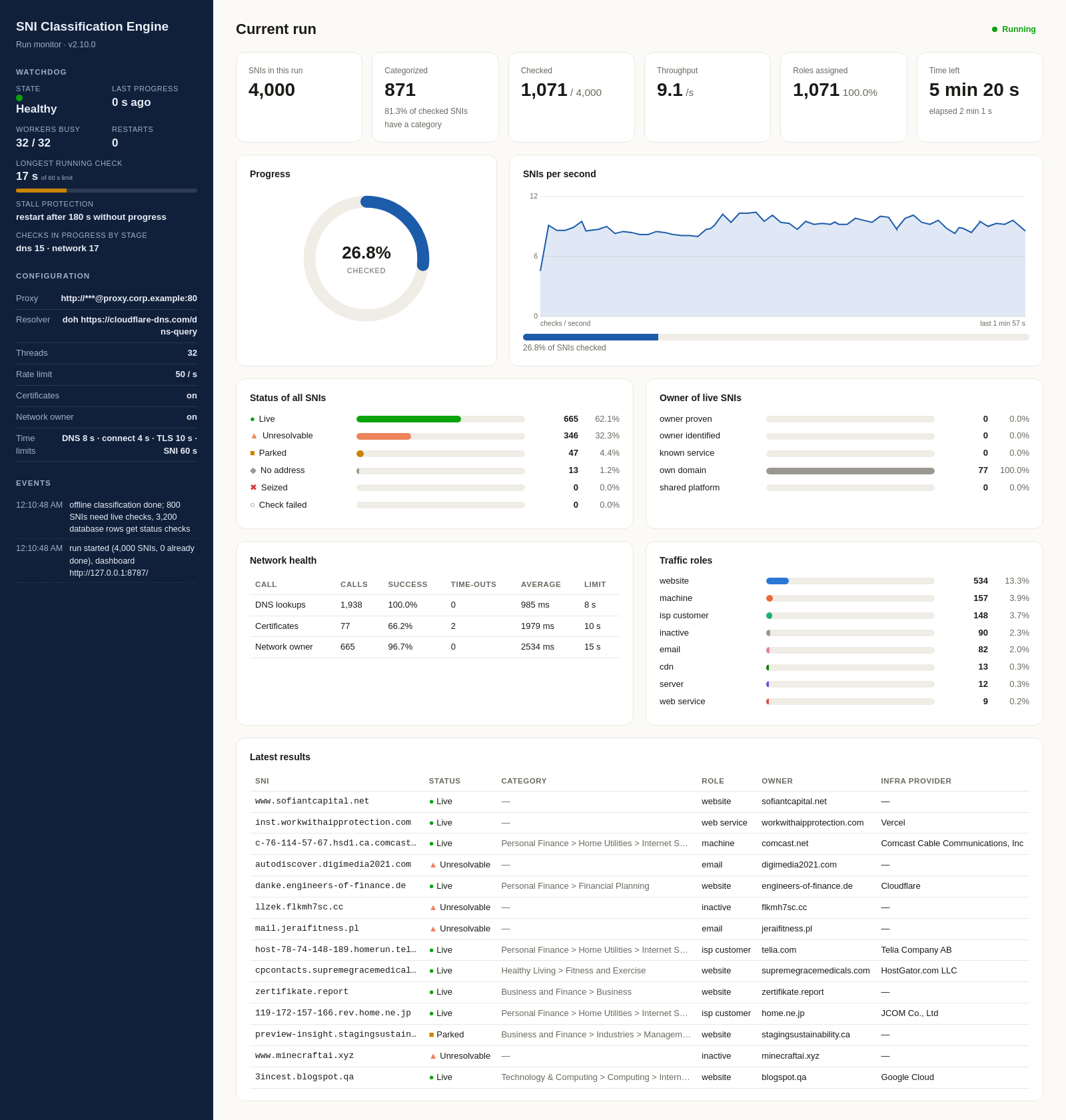
A real run with Live Owner Checks on every row. The proxy is shown with its credentials hidden.
Configuration
One plain text file. Add your proxy and resolver, and Live Owner Checks uses them for every lookup.
# engine.ini
[engine]
database     = /opt/sni_engine/data/roots.db
threads      = 32
processes    = 0   # Engine Offline: one process per core, 0 = all cores
live_checks  = yes
check_database_rows = yes

[network]
# your outbound proxy; empty = direct
proxy        = http://user:[email protected]:3128
resolver     = doh          # or: dns
doh_url      = https://cloudflare-dns.com/dns-query
nameservers  = 10.0.0.53, 10.0.0.54
rate_limit   = 50
retries      = 2
certificates = yes
rdap         = yes
registration_records = yes

[time_limits]
dns_timeout     = 8
connect_timeout = 4
tls_timeout     = 10
rdap_timeout    = 15
sni_time_limit  = 60

[watchdog]
enabled       = yes
stall_seconds = 180
max_restarts  = 20

[dashboard]
enabled = yes
bind    = 127.0.0.1
port    = 8787
theme   = 5
| Setting | Meaning |
|---|---|
live_checks | no runs Engine Offline only: no network access at all |
processes | Engine Offline: number of engine processes working side by side, one per processor core; 0 uses all cores. Results are merged into one file |
check_database_rows | Also check SNIs whose IAB category comes from the database: status and infra provider for every row |
proxy | HTTP proxy for all lookups of Live Owner Checks, with optional user and password |
resolver | doh: DNS over HTTPS through the proxy. dns: your own DNS servers |
rate_limit | Maximum network calls per second for the whole run |
certificates | Read the certificate a server presents; needed for proven owners and seizures |
rdap | Network owner: looks up who operates the server's network in the public internet registries (for example Amazon, Cloudflare or a telecom) and fills Infra Provider. Off by default |
registration_records | Last step of Live Owner Checks: reads the root domain's public registration record through your proxy to find the owner company when nothing else proved one. One lookup per root domain. On by default |
*_timeout | Limit in seconds for each kind of network call |
sni_time_limit | Overall time limit per SNI in seconds |
stall_seconds | Seconds without a finished SNI before the run resumes from its saved place (with --supervise) |
bind, port | Where the dashboard listens; 127.0.0.1 keeps it on this machine |
theme | Dashboard layout; the default is the one shown above |
Your data stays inside your network
The engines run on your machines. Here is exactly what each one sends out.
Your data stays with you
Engine Offline and Live Owner Checks send nothing to us: no telemetry, no licence call home, no cloud service. API Classification sends registered domains only, and only if you enable it.
Controlled egress
Engine Offline makes no connections. Live Owner Checks only use your proxy and your resolver, with your rate limit.
Local dashboard
Served on 127.0.0.1 by default and read-only. Configuration secrets are masked on screen.
Compiled delivery
Rules and engine logic ship as compiled modules for Linux x86-64 with a Python 3.12 runtime.
Simple updates
A weekly package updates the root database and the reference lists with every new and changed domain. Daily update files on request, and a full refreshed snapshot every quarter.
Proven at volume
The rules behind every engine built our database of 1.65 billion SNIs/host names.
Part 4 · Data dictionary
The 1.65B SNI database and the results of its engines come in the same 12 columns. This part lists each column, what it holds and every value it can take.
↑ ContentsColumns and values
Every column of the 1.65B SNI database and every value a column can hold. The IAB category values are the IAB Content Taxonomy v3; the full list is on the IAB v3 categories page.
Columns
| Column | Content | Possible values | Example |
|---|---|---|---|
SNI | The server name as it appears in the TLS connection, normalised to lower case and without a trailing dot. | Any host name or IP address | api.spotify.com |
Root Domain | The registered domain the SNI belongs to, found with the public suffix list. | Any registered domain | spotify.com |
Category | The main IAB Content Taxonomy v3 category of the SNI, written as the full path with > between the tiers. | IAB v3 categories; empty when no category can be proven | Entertainment > Music |
Multiple Categories | All IAB v3 categories that match the SNI, each with its confidence score in brackets, separated by semicolons. | IAB v3 categories with a score from 0.00 to 1.00 | Technology & Computing > Consumer Electronics > Smartphones (0.73); Technology & Computing > Computing > Computer Software and Applications > Operating Systems (0.15) |
Method | The source the IAB category was taken from: the host name itself, its root domain, the root domain's owner, or an owner proven for the host. | See Method, six values | root_domain_represents |
Description | A short description of the website, taken from the site itself, for root domains that have one. | Free text, or - when there is none | موقع مختص بتطوير الأشخاص بمجالات العمل والدراسة والإبداع |
Role | The traffic role of the host name: what the server behind it does, for example a website, a content delivery host or an API. | See Role, 21 values | api |
Owner | The domain of the company that operates the host name, when it is known from our tables or proven by Live Owner Checks. | A domain, or unknown for shared infrastructure | youtube.com (for r3---sn-ab5l6nr6.googlevideo.com) |
Infra Provider | The hosting, content delivery, advertising or platform provider behind the host, when the host runs on shared infrastructure. | Provider name, for example Cloudflare, Amazon Web Services, Google Ads; empty for company-owned hosts | Google Ads (for pagead2.googlesyndication.com) |
Role Confidence | How firmly the traffic role was established: from a fixed table, from a word in the host name, from a weak pattern, or inherited from the root domain. | See Role Confidence, four values | medium |
Non-production | Whether the host name belongs to a test, staging or development system rather than production. | yes, or empty for production hosts | yes (for stage.acrobat.adobe.com) |
Status | The result of Live Owner Checks for the host: whether it is live, parked, seized, unresolvable or flagged. Present in the results of the engines. | See Status, nine values | Live |
Method
| Value | Meaning |
|---|---|
sni_direct | The host name itself was categorized from its own website content. |
root_domain_direct | The SNI is a root domain and carries its own category. |
root_domain_represents | The SNI takes the category of its root domain. |
root_domain_represents_owner | The SNI takes the category of the company that owns its root domain; the owner was proven in our pipeline or by the domain's registration record. |
owner_domain_represents | The SNI takes the category of the owner that Live Owner Checks proved for this host. |
not_in_database | No category: the root domain is not in the database and no owner could be proven. |
Role
Engine Offline sets the first 15 roles from the host name and the root domain, and server for generated machine names. Live Owner Checks sets web_service, server, parked, seized and inactive for hosts whose name shows no role.
| Value | Meaning |
|---|---|
website | Pages that people open and read, including the root domain itself and its www host. |
cdn | Content delivery hosts that serve images, video, scripts, fonts and files. |
api | Application interfaces that apps and websites call, including configuration services and production back ends. |
ads_tracking | Advertising, analytics, tracking and click-redirect servers. |
login | Sign-in and single sign-on services. |
email | Mail servers and webmail. |
telemetry | Hosts that receive usage, crash and performance reports from apps and devices. |
download_update | Software download and update servers. |
remote_access | VPN gateways and remote desktop services. |
push_chat | Real-time messaging and push notification servers. |
network | Name servers, proxies, gateways and time servers. |
cloud_hosting | Storage buckets and hosting platforms where the customer behind the host is not visible. |
certificate | Certificate authority and certificate validation hosts. |
ip_address | The SNI is an IP address rather than a name. |
isp_customer | A subscriber line of an internet provider, recognised by its dynamic address name. |
web_service | From Live Owner Checks: a live host with a valid certificate for its name but no role in its name. |
server | A host whose name shows no role: a generated machine name (hashes, instance names), or, from Live Owner Checks, a live host without a certificate for its name. |
parked | From Live Owner Checks: the domain is parked or offered for sale. |
seized | From Live Owner Checks: the domain shows a law-enforcement seizure notice. |
inactive | From Live Owner Checks: the name does not exist or points to no server. |
unknown | No role could be set because the root domain is unknown and the live check did not complete. |
Role Confidence
| Value | Meaning |
|---|---|
high | The role comes from a fixed table or an unambiguous pattern, such as shared infrastructure, a known service or an IP address. |
medium | The role comes from a word in the host name, such as api, cdn, login, config or prod. |
low | The role comes from a weak pattern, for example a generated machine name. |
inherit | The host name has no role word, so the role is inherited from the root domain (website) or from the live status. |
Non-production
| Value | Meaning |
|---|---|
yes | The host name is a test, staging or development host, recognised by words such as test, staging, dev, qa or sandbox in its name. |
(empty) | A production host. |
Status
| Value | Meaning |
|---|---|
In database | The root domain is in the database, so the row was not checked live. |
Live | The name resolves and points to a server. |
Unresolvable | The name does not exist, or its DNS is broken. |
No address | The domain is registered but points to no server. |
Parked | The domain is parked or offered for sale. |
Seized | The domain shows a law-enforcement seizure notice. |
Unwanted software | The domain is flagged for unwanted software by the optional malware and unwanted software detection of API Classification. |
Phishing or scam | The domain is flagged for phishing or a scam by the same optional detection. |
Check failed | The check did not complete within its time limit; the SNI keeps its role and can be checked again. |
How the engines fill these columns: Part 3, SNI Classification Engine.
Part 5 · Free sample and delivery
Download 1,000 host names and see how the extension reaches your system.
↑ Contents1,000 host names, every database column
SNI, Root Domain, Category, Multiple Categories, Method, Description, Role, Owner, Infra Provider, Role Confidence and Non-production, as one CSV file.
Delivery and licence
The extension is delivered through the same API and update routine as the domain database file, and joins to it through the root domain. The engine runs on your own servers, with no outside calls in offline mode. The SNI database is also sold as a standalone product. Customers of the domain filtering databases can upgrade to it, with their current licence counting toward the upgrade. It is a flat yearly licence, with no metering by users or traffic.